





Types of Websites Built with WordPress
WordPress is used to build corporate websites, online stores, news and magazine sites, blogs, portfolios and membership sites. They all run on the same core; what sets them apart is the theme you choose, the plugins you install and how the content is organized. We explained the basics of the software in our What is WordPress article; below you’ll find what each type of site needs, along with examples verified by official sources.
Corporate websites
A corporate website presents a company’s services, team and contact details. What it needs: a separate page for each service, a clear menu, a contact or quote form, a map and, if necessary, multilingual support. Disney’s Disney Connect site and the publisher Penguin Random House are large-scale examples of this type, while the website of Noma, the restaurant in Copenhagen, shows that a small business can use the same platform. In corporate website projects, the first step is to plan the service pages around the phrases customers actually search for.
E-commerce Websites
The WooCommerce plugin adds store functionality to WordPress: products and variations, cart, payment methods, shipping rules, stock and order management. On top of that, you need a payment provider integration, an SSL certificate and hosting that doesn’t slow down at peak times. The cleaning sponge brand Scrub Daddy and the ice cream brand Van Leeuwen Ice Cream are among the stores featured on WooCommerce’s official showcase page. When building an e-commerce website, test the payment and shipping flow with a real test order before launch.
News and Magazine Websites
These are sites that publish many articles every day and separate author and editor roles. What they need: a category and tag structure, a publishing workflow based on editorial approval, caching and a server that can handle sudden traffic spikes, a news sitemap and ad slots. Rolling Stone and TIME are among the magazines that publish with WordPress. When setting up a news website, plan caching and server capacity from day one, because traffic surges suddenly during breaking news.
Blog Websites
Blogs are built around articles being read and found through search. What they need: a readable theme, a logical category structure, tables of contents, internal links, an SEO plugin and fast-loading images. The recipe site Budget Bytes is one of the well-known blogs featured in the WordPress.org showcase. When starting a blog website, choosing the right URL structure (permalinks) from the start saves you from having to set up mass redirects later.
Portfolio Websites
These are sites where photographers, designers, architects and artists show their work. What they need: large but lightweight images (WebP), project pages, galleries and a layout that’s easy to browse on a phone. Photographer Jimmy Nelson’s site, where he showcases his projects and sells prints, and Taylor Swift’s official site are among the examples in the WordPress.org showcase. If image sizes aren’t set correctly on portfolio websites, the site slows down most on phones.
Membership Websites
These are sites where some content is available only to members or subscribers. What they need: a membership plugin, a payment system for paid subscriptions, content restriction rules and a dashboard where members manage their accounts. Budget Bytes’ paid membership section and Rolling Stone’s subscriber-only content show this functionality working on WordPress. If membership and payments are set up together, the project gets close to an e-commerce build in scope.
Verified Examples of Famous WordPress Websites
Some of the “brands that use WordPress” lists circulating online are out of date, because sites change platforms over time. We verified the examples below using official sources only: the WordPress.org Showcase page, case studies from WordPress VIP (WordPress’s enterprise hosting service) and WooCommerce’s showcase page.
| Site | Type | Highlight | Verification |
|---|---|---|---|
| NASA (nasa.gov) | Government, science | The NASA and NASA Science sites run on WordPress at enterprise scale. | WordPress.org Showcase |
| The White House (whitehouse.gov) | Government | The official site of the US executive branch, publishing statements, briefings and media content. | WordPress.org Showcase |
| Rolling Stone | Magazine | Part of the content is available through a paid subscription. | WordPress.org Showcase |
| TIME | Magazine | Moved from a legacy publishing system to WordPress and handles high-traffic periods like “Person of the Year” on this platform. | WordPress VIP case study |
| CNN Brasil | News | Runs on WordPress VIP; the migration used open-source solutions and off-the-shelf plugins. | WordPress VIP case study |
| Disney Connect | Corporate | Custom Gutenberg blocks let editors build pages without writing code. | WordPress.org Showcase |
| Ubisoft Québec | Corporate, recruiting | A recruiting site presenting the game studio’s work culture and open positions. | WordPress.org Showcase |
| Budget Bytes | Blog, membership | Recipe archive, meal planning resources and a paid membership section. | WordPress.org Showcase |
| Taylor Swift | Artist website | News, tour dates, an events calendar and galleries. | WordPress.org Showcase |
| Scrub Daddy | E-commerce | A WooCommerce store selling directly to consumers. | WooCommerce showcase |
These examples show that WordPress isn’t just for small blogs. Nor is it limited to public websites: Ubisoft built the intranet that brings its teams around the world together on WordPress VIP. That said, large organizations usually work with enterprise hosting and their own development teams, so it isn’t always possible to recreate the same look exactly with an off-the-shelf theme. The right setup for you is the one that fits your own scale and budget.
Source: WordPress.org Showcase
How to Tell If a Site Uses WordPress
- Right-click the page and choose “View page source,” or press Ctrl + U.
- In the source, use Ctrl + F to search for file paths containing /wp-content/ or /wp-includes/.
- Add /wp-json/ to the end of the address and open it; if you get a WordPress REST API response, the site is most likely WordPress.
These traces may not be visible on headless sites, which use WordPress only for content management and serve the front end with a different technology. For a definitive answer, it’s more reliable to check the site’s own statement or an official source like the ones above.
This Site Runs on WordPress Too: The bymeoman.com Example
The bymeoman.com site you’re reading also runs on WordPress; we apply the structure we recommend to you on our own site first. We’ve been working with WordPress since 2008, and instead of an off-the-shelf theme, this site uses “meoman,” a theme we wrote ourselves.

Theme and Page Structure
The pages were built with Elementor and custom HTML blocks. The site has more than 240 service pages, over a thousand blog posts and WooCommerce guides. Instead of designing each of these pages individually, we defined the recurring elements in the theme: the package cards, FAQs and quote form on service pages work in the same layout on every page. That’s why custom WordPress theme design is a lasting solution for sites with many similar pages.

Technical foundation
- We use Rank Math as our SEO plugin; pages include Service, FAQPage and BreadcrumbList structured data.
- Caching is handled by LiteSpeed Cache, and the server runs LiteSpeed as well.
- Images are in WebP format; fonts load from our own server rather than an external service.
- Services are grouped in a mega menu in the main navigation, so visitors reach the service they need from a single menu.

Blog Post Layout
Our blog posts start with a “Key takeaways” box, followed by a table of contents, and end with an FAQ section. The article you’re reading follows the same layout: readers reach the answer they’re looking for without endless scrolling, and search engines can easily tell the sections apart by their headings.

What to Check When Reviewing a Portfolio Site
When you look at a site built by an agency or designer, examine how it works as well as how it looks. A site that looks good but loads slowly on phones or shows up incorrectly in search results suggests that your own site, built by the same team, may run into similar problems.
| Criterion | How to check | What to look for |
|---|---|---|
| Speed | Enter the address in PageSpeed Insights and look at the real-user data (Core Web Vitals) section. | LCP should be 2.5 s or less, INP 200 ms or less and CLS 0.1 or less. The PageSpeed score alone is not a ranking factor. |
| Mobile view | Open the site on a phone and try the menu, forms and tables. | Text should be readable without zooming, buttons easy to tap, and the page shouldn’t scroll sideways. |
| SEO setup | Check the title, meta description and canonical tag in the page source; view the sitemap by adding sitemap_index.xml or wp-sitemap.xml to the end of the address. | The canonical is normally the page’s own address. You can check structured data with Google’s Rich Results Test. |
| Ease of management | Ask the agency for a short walkthrough of the admin dashboard. | Adding posts and pages shouldn’t require code, and the number of plugins should be limited to what’s actually needed. |
| Security and maintenance | Check that the address opens with https and that the forms and the 404 page work. | Ask who handles maintenance and how often updates are done. |
Most of these checks take just a few minutes with free tools. The lab result in PageSpeed Insights can vary from one test to the next, so compare several pages instead of deciding based on a single measurement.
Source: Google Search Central: Core Web Vitals
What to Look for on an Agency’s Portfolio Page
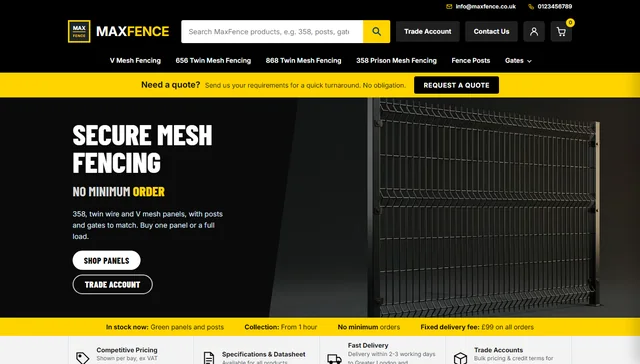
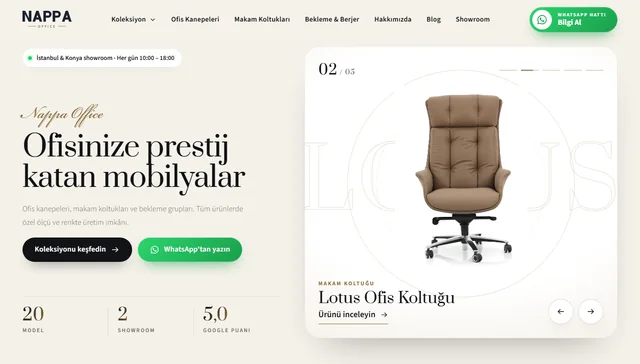
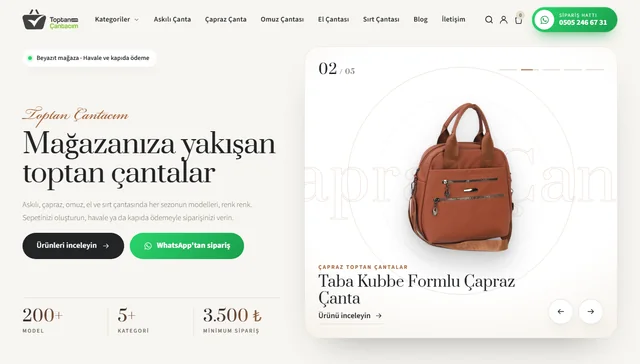
Most readers who search for “WordPress website portfolio examples” want to evaluate the agency or specialist they’ll be working with. A portfolio page is the starting point for that evaluation, but it isn’t enough on its own.
- Live link: If a portfolio entry is just a screenshot, you can’t open and test the site yourself; ask for the live address.
- The agency’s role: Did the agency build the site from scratch, only do the design, or does it handle the maintenance? Ask separately for each portfolio entry.
- Work similar to yours: If you’re opening a store, look at the agency’s e-commerce work; if you need a corporate site, look at how their service pages are structured.
- Verifiable reviews: Client reviews visible on an independent platform, such as a Google Business Profile, are more reliable than testimonials that appear only on the agency’s own site.
- Current state: If a portfolio site is broken, has reverted to an old design or has moved to a different platform, ask why; the answer also tells you something about the agency’s support after delivery.
The same criteria apply to us. More than 200 client reviews and a 5.0 rating are a starting point; the real proof is working sites you can open and examine, like the one you’re reading now.
Adding a Portfolio Page to Your Own Site
If you want to showcase your own work on your site, WordPress offers two ways to do it.
- A single Portfolio page: If you have only a few projects, create a new page and add a section for each project with an image, a short description and a link. The Gallery and Columns blocks in the block editor, or similar tools in Elementor, are enough for this.
- Custom post type: If you have many projects, define a custom post type called “Portfolio.” Each project gets its own page, can be filtered by industry, and the list page updates automatically as you add new projects. The post type can be registered in code with the register_post_type function or with a plugin.
Each portfolio entry should include, with the client’s permission, their name and industry, the scope of the work, a screenshot in WebP format, a live link if available and a short client testimonial. Adding review structured data to testimonials on your own site, however, won’t bring stars to search results: Google doesn’t consider reviews that a business publishes about itself on its own site eligible for star ratings.
Source: Google Search Central: Review snippet structured data
Analysis: Uploading portfolio images as a horizontal crop of the first screen, rather than a full-page screenshot, helps the list page load faster on phones.
Our WordPress Website Setup Process
If you’d like us to build your site, the process runs in four steps, entirely remotely.
- Initial call: In a scheduled call, we discuss the type of site, your goals and the example sites you like.
- Quote: We reply to your quote request within 24–48 hours with a quote that clearly sets out the scope.
- Build: We set up a ready-made or custom theme, the page structure, the necessary plugins, the SEO foundation (Rank Math, sitemap, structured data) and caching.
- Handover: Before launch, we check the forms, mobile view and speed, and show you how to update the content yourself.
You’ll find our packages and scope on our WordPress website setup page. The bymeoman.com structure you’ve seen in this article can be a starting point for your project too; the choice of theme and plugins is made fresh for each site based on its needs.
Frequently Asked Questions
Can you build any kind of website with WordPress?
Corporate, e-commerce, news, blog, portfolio and membership sites can all be built with WordPress; workflows not covered by existing plugins may require custom development.
How can I tell if a site was built with WordPress?
Search the page source for /wp-content/ or /wp-includes/ paths; on headless sites whose front end is served by a different technology, these traces may not be visible.
Do famous brands really use WordPress?
NASA, the White House and Rolling Stone are featured in the WordPress.org Showcase, and TIME’s and CNN Brasil’s moves to WordPress are described in WordPress VIP case studies.
Are there examples of e-commerce sites built with WordPress?
WooCommerce’s official showcase page features stores running on WordPress, such as Scrub Daddy and Van Leeuwen Ice Cream.
Will a site built with a ready-made theme look professional?
A lightweight ready-made theme customized to your brand is enough for most corporate sites; if you need many similar pages or a unique structure, a custom theme is the better fit.
What do I need to do to have bymeoman build my site?
Just get in touch through the quote form or request a call; we reply within 24–48 hours with a quote that clearly sets out the scope.
Websites built with WordPress range from small portfolios to government sites; the difference comes down to the choice of theme, plugins and infrastructure. When choosing examples for your own site, look at speed, mobile view and ease of management as well as appearance.
In summary
WordPress is used for corporate, e-commerce, news, blog, portfolio and membership sites; examples from NASA to bymeoman.com show that, with the right theme and infrastructure, it works at very different scales.


